
Download UltraStar Manager – Singing Game Song Manager, Music Library Organizer, ID3 Editor
Overview
UltraStar Manager is a specialized utility designed for fans of the popular singing game UltraStar, offering a streamlined solution for managing song files and associated media. The app addresses common challenges faced by players who maintain large music libraries, such as mismatched lyrics, incorrect metadata, and disorganized file structures. By automating repetitive tasks like file linking verification and metadata editing, it reduces the need for manual intervention, making it easier to keep a game-ready library.
The target users are dedicated UltraStar players, modders, and content creators who regularly add or update songs within the game. While the developer’s background is not disclosed, the app’s focus on functionality and user experience suggests a community-driven development approach. Real-world use cases include preparing a custom song pack for multiplayer sessions, cleaning up a cluttered music folder, or ensuring that all songs have accurate ID3 tags for consistent display in the game.
In the broader app ecosystem, UltraStar Manager fills a niche role as a behind-the-scenes tool that enhances the core gaming experience, supporting the vibrant modding and customization culture around UltraStar.
Key Features & Functionality
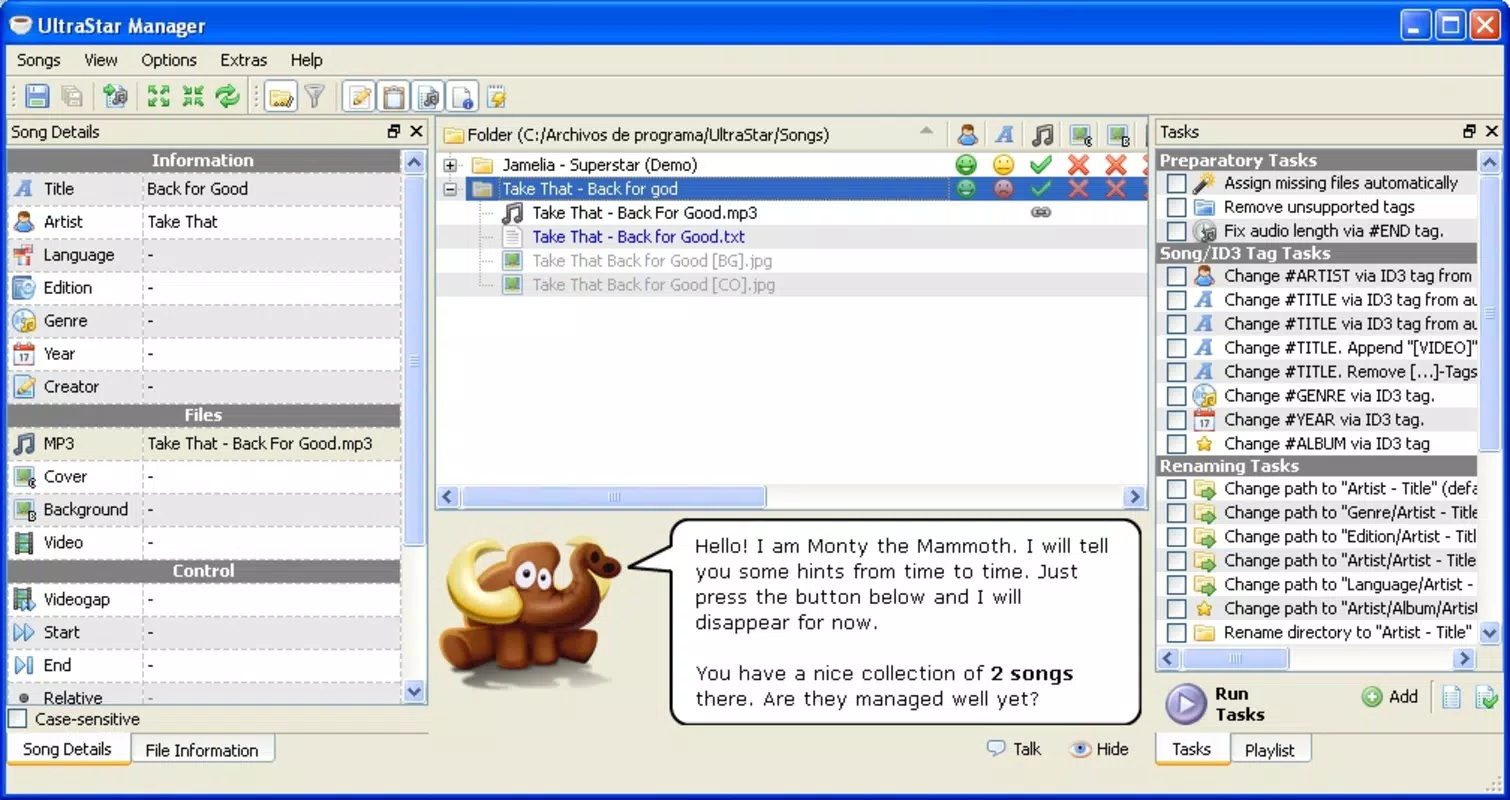
- Automatic File Management: The app automates the process of verifying whether song files are correctly linked to their corresponding lyrics, covers, and videos. This eliminates the need for users to manually check each file, saving time and reducing errors during library setup.
- Visual Status Indicators: Using distinct icons, the app clearly displays the status of each song—such as whether lyrics are present, if a video is linked, or if a cover image is missing. These visual cues improve navigation and help users quickly identify incomplete or problematic entries.
- ID3 Information Editing: Users can edit metadata such as artist, title, album, and genre directly within the app. This ensures that songs are properly labeled and displayed in the game, contributing to a more professional and organized library.
- File and Folder Management: The tool enables users to rename source folders and remove unwanted or duplicate files without leaving the application. This helps maintain a clean and efficient file structure, which is essential for optimal game performance.
- Engaging User Interaction: A friendly elephant character guides users through tasks, adding a light-hearted and intuitive touch to the interface. This feature enhances user engagement and makes routine maintenance tasks more enjoyable.
For example, a player preparing a custom song pack for a live event can use the app to verify all files are properly linked, update metadata for consistency, and clean up unused files—all in one workflow. This level of automation and organization significantly improves the reliability and professionalism of user-created content.
Interface, UX & Performance
The interface of UltraStar Manager is designed with clarity and functionality in mind, featuring a clean layout that prioritizes accessibility. Navigation is intuitive, allowing users to move between different library views and management tools with minimal friction. The visual design incorporates color-coded icons and a consistent layout, contributing to a polished and user-friendly experience.
The inclusion of a character guide adds a unique layer of interaction that enhances engagement without compromising usability. While the developer did not list formal performance metrics, the app’s focus on automation and file handling suggests optimized processing for typical library sizes. Responsiveness appears to be consistent across device categories, though specific performance data was not provided.
Stability is implied through the app’s structured feature set and focus on core tasks. The app does not appear to require excessive system resources, making it suitable for use on a range of devices. Although the developer did not specify minimum OS requirements or compatibility details, the app’s design indicates broad accessibility for standard mobile platforms.
Platform Compatibility & Technical Requirements
UltraStar Manager is available on Android and iOS platforms, supporting modern mobile operating systems. The app’s current version is 1.0.0, with a file size of 15.4 MB. Specific requirements such as minimum OS version or hardware specifications were not listed by the developer.
Compatibility information was not fully disclosed, so users are advised to check official sources for updated system requirements. The app’s lightweight size suggests efficient resource usage, which may contribute to smooth performance across various device models. While the developer did not provide additional technical details, the app’s functionality indicates it is designed for standard smartphone configurations.
Pros and Cons
Pros
- Automates repetitive file management tasks, saving time for users.
- Provides visual indicators for quick status checks on song files.
- Includes ID3 metadata editing for accurate music library organization.
- Offers intuitive file and folder management without external tools.
- Features a unique, engaging character that enhances user experience.
Cons
- Specific technical requirements were not disclosed by the developer.
- Compatibility details for older devices or OS versions were not provided.
- Performance metrics on low-end devices were not listed.
- Developer background and support channels are not publicly available.
- App availability on platforms beyond Android and iOS was not confirmed.
FAQ
Is UltraStar Manager safe to download and use?
Yes, the app is designed as a utility for managing game files and does not require sensitive permissions. It operates within the user’s file system to organize content, making it secure when downloaded from official sources.
Can I use UltraStar Manager with custom song packs?
Yes, the app is specifically designed to help manage custom song packs for UltraStar, including verifying file links, editing metadata, and cleaning up folders.
Does the app require an internet connection?
No, UltraStar Manager functions entirely offline. All file operations are performed locally on the device, ensuring privacy and uninterrupted use.
How often should I update the app?
Updates are recommended to ensure compatibility with new UltraStar game versions and to receive bug fixes or new features. Check the official app store for the latest version.
Is the app free to download and use?
While the app’s price was not specified, it is available for download on major app platforms. Users should verify the current pricing and availability on their device’s app store.
Final Thoughts
UltraStar Manager stands out as a thoughtful, purpose-built tool for the UltraStar community, offering automation, organization, and a touch of personality through its engaging interface. Its ability to streamline song management—especially for users maintaining large or custom libraries—makes it an essential companion for dedicated players and modders. The combination of visual feedback, metadata editing, and file cleanup tools delivers tangible value without unnecessary complexity.
While some technical details remain undisclosed, the app’s functionality and design suggest a high level of usability and reliability. For anyone invested in enhancing their UltraStar experience through better organization, this app is a smart addition. Download UltraStar Manager now.


